
Pulsar 1.133.0: El Niño edition
You waited all summer for it… Pulsar 1.133.0 is available now!
Pulsar v1.133.0: El Niño edition
Greetings from the west coast of the US, where I’m writing this in the middle of a sudden rainstorm! Much like this year’s El Niño, the 1.133.0 release of Pulsar is unusually strong; unlike this year’s El Niño, it probably won’t have any effect on agricultural yields or mountain snowpack.
Since you’ve had to wait longer than usual for this release, you’re rewarded with a larger-than-usual list of new features, many of which we’re quite excited about:
Terminal features: directory tracking, hyperlinks, clickable file paths
We were pround to deliver a built-in terminal package for the first time as part of 1.132.0 back at the end of spring. Now we’ve enhanced it with some killer features:
- Terminal “hyperlinks” (as described in OSC 8) allow for arbitrary terminal text to act as a hyperlink to an arbitrary destination. The
terminalpackage already supported clickable text that matched URL patterns, but this is different. Hovering over the hyperlinked text will reveal the linked URL (Rickroll protection!) and by default you must hold a modifier key while clicking, just as when you click on bare URLs. - Your terminals now track their working directories! Previously, they knew the directory they started in, but lacked the shell integrations needed to keep track of changes to
cwd. Now that shell integration is present (forbash,zsh,fish, andpowershell/pwsh, at least), we can do things we couldn’t before. The title of your terminal tab will change whencwdchanges, and when you duplicate terminals (via split right, split left, etc.) new terminal’scwdwill match the currentcwdof the original terminal. - Tracking of
cwdwas needed in order to deliver a much more exciting feature: clickable file paths! Anything that looks like a path to a directory or a file — whether absolute or relative — can now be clicked in the same manner as hyperlinks and URLs. (Withoutcwdtracking, we wouldn’t be able to interpret relative file paths properly.) For instance, you can now run a linter against your code and click on any of the file paths it prints out in order to address the things it flags.
Some other terminal-related bug fixes:
- Ensured terminal commands like Terminal: Open Bottom Dock were opening in the correct places.
- Implemented alternative clipboard keybindings for Windows and Linux users, since the default Ctrl-C and Ctrl-V bindings have other meanings in terminal contexts. Copy and paste within a terminal are now bound to Ctrl-Shift-C and Ctrl-Shift-V, respectively, as is standard in most terminal emulators on Windows and Linux. (Since macOS uses Cmd as its primary modifier, it is unaffected.)
Electron bump: 32.3.3
Until we’re caught up to Electron’s releases, every release of Pulsar will be jumping ahead as much as we can get away with. This won’t feel like a new feature necessarily, but it certainly will once we make larger leaps: each Electron bump delivers newer versions of Node and Chromium with more and better APIs and web features.
This release takes us to Electron 32.3.3 and is the last release that will support macOS 10.15 (Catalina). If you’re still on Catalina, it’s likely because your machine is too old to upgrade further… and that means that the next release of Pulsar likely won’t work on your machine. We don’t like ending support for older OSes, but since we’re tethered to Electron (and its functionality/security updates), it’s out of our hands.
Pulsar 1.134.0 will jump ahead to Electron 37 and will itself be the last release that supports macOS 11 (Big Sur). It will also be the first Linux release of Pulsar that runs natively on Wayland without requiring an --ozone-platform flag.
We don’t want to rug-pull on anyone, so these bumps are done deliberately and with plenty of warning. After 1.134.0, we should be able to go a bit faster with Electron version bumps, since (to date) no versions of Electron newer than 37 have the effect of ending support for any OS version.
File-watching: new adapters and new architecture
Pulsar has many use cases for attaching a watcher to a certain directory so it can find out about any filesystem events that happen anywhere beneath it. We have two watchers:
- a basic watcher that listens to specific files and directories non-recursively; and
- a more feature-filled watcher that listens to all filesystem changes within a directory (no matter how deep).
The first watcher is used for crucial tasks like detecting when your open buffer have their contents changed on disk. The second watcher is available for packages to use however they like — an improvement over the distant past in which many Atom packages that needed file-watching had to handle it themselves, meaning lots of library redundancies and duplicated work. For instance, I maintained an ESLint package that would change some internal settings whenever it detected the project’s .eslintrc config file changed.
Ever since Pulsar split off from Atom, we’ve been using a library called nsfw (Node Sentinel File Watcher) to implement this file-watcher. But the infrastructure is in place to allow for swappable file-watching implementations; the Atom folks added it back when they were working on their own file-watcher library.
We don’t have many gripes with nsfw, but it’s good to take advantage of this modularity! Some users in our testing have had better experience with a different library named @parcel/watcher; this is the same library that VS Code uses. It’s got better support for ignored files (specifying via glob instead of via an exact list) and seems to perform a bit better in some unusual scenarios (like symlinks that create loops).
We’ve added @parcel/watcher as an option, though nsfw is still the default. But we’ve also taken this opportunity to overhaul the existing file-watching implementation so that it (like @parcel/watcher) runs in a separate process. Each window will have a single parallel process in charge of file-watching and will report back to the window via message passing.
This worker-process architecture mirrors VS Code’s approach to file-watching. We’ll be leaning on this approach in other areas, too, in order to reduce the number of libraries that need to run in Electron’s renderer process. (We talked about this approach when we unveiled the terminal package in the last release; it reduces complexity and decreases the likelihood of application crashes.)
If you want to switch to the new file-watching implementation, check out the Core: File System Watcher setting. This setting existed before, but had only a single vestigial option in a drop-down menu. Now there are three: Node Sentinel File Watcher, @parcel/watcher, and Default (let Pulsar decide). This last option is the default, and for now that means nsfw — but we may change this in the future. You can change the implementation whenever you want without even needing to reload the window.
New “deleted” file state
In 1.132 we introduced a new “conflicted” state for pane items and editors especially. A file enters such a state if you (1) open it, (2) make changes (without saving), and then (3) have the file’s contents on disk change (usually from another program) in a way that clashes with the uncommitted modifications you’ve made.
Pulsar 1.133 adds a companion state: deleted. An editor can enter the deleted state if the user has opened a file for editing and that file later gets deleted by some other program. This is most likely to happen if you switch branches in version control — a file that exists in one branch may not exist in another. (Another long-present setting — core.closeDeletedFileTabs — will close such tabs altogether upon deletion, but it’s not enabled by default.)
We’ve always been able to detect such deletions, but until this release they also flipped the buffer into the “modified” state, since technically this is similar to a new file that has never been committed to disk. But a buffer whose contents were not changed by the user since the file deletion should be safe to close without an “Are you sure?” prompt! (If the buffer has been modified, deletion of the backing file on disk will trigger the existing conflicted state; this will happen whether the modification occurs before or after the deletion.)
But in order to ease users into this new behavior, we’ve introduced a new setting to govern it; if you want not to be prompted when abandoning a deleted file, you must opt out of the existing behavior. The setting is editor.promptWhenAbandoningDeletedFile; it defaults to true, but you can flip it to false if you want fewer prompts. (You can also find it by opening the settings pane, selecting the Editor tab, and finding Experimental: Prompt When Abandoning Deleted File.) Uncheck it and you’ll no longer be prompted to save deleted files unless you made uncommitted changes.
For the built-in UI themes, deleted items have their own appearance in tabs to make them easy to spot:
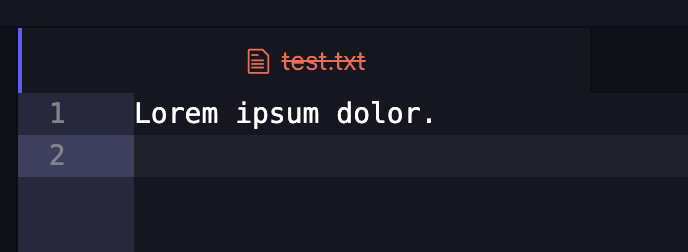
If you like this, enjoy! If you hate it, you can disable it by opening the settings for the tabs package and unchecking Enable Item Status Coloring (or set tabs.enableItemStatusColoring to false in your config.cson).
If you maintain a custom UI theme, you can style deleted tabs by targeting the deleted class name. Or, if you’re using a custom UI theme that isn’t actively maintained, you can add styles to your user stylesheet:
@import "ui-variables";

.tab.deleted {
  color: @text-color-error;
  text-decoration: line-through;
}
As in the screenshot above, this example CSS styles the text of a deleted item’s tab to be red and adds a strike-through decoration. (Always a good idea to indicate status in ways other than color alone!)
Other fixes and improvements
-
There are new methods defined on the
atomnamespace for package authors and init-file hackers:atom.showItemInFolder,atom.trashItem,atom.openExternal, andatom.openPath. These do exactly what you think they do. Previously, packages (even built-in packages) had to use the deprecated@electron/remotepackage to perform these very common OS-integration tasks, but we’re trying to reduce reliance on@electron/remoteto guard against future breakages. -
As usual, there are a handful of improvements to syntax highlighting and language integration overall. You’ll notice better highlighting of template strings in Python, better support for Perl’s class syntax, and much-improved support for C# in general.
-
We fixed a regression in syntax highlighting performance on large files that had existed since 1.127.0. Since then, disruptive changes to big files resulted in a pause while the syntax highlighting caught up. That’s not how it used to work! We’ve now restored the proper behavior: the editing itself now stays smooth even if the highlighting lags a bit behind.
-
We’ve updated some of the libraries we depend on for file-watching and Git integration in order to fix some rare crashes, especially on window reload and application exit.
-
We’ve updated
ppmto use the same Node version as Pulsar (20.18.1) and to fix some minor bugs and security issues. -
The Windows installer is now a bit prettier — with a branded sidebar image and a higher-resolution icon. It’s also better at cleaning up after itself during uninstallation, including removing any Pulsar-related context menu items in Windows Explorer.
Call for new contributors
Pulsar is more than three years old as a project! But time means change, especially where our core team is concerned. Our long-time team member @DeeDeeG has stepped back from the project after several years of heroic devops work — setting up our CI matrix and our release build pipeline across three operating systems and two processor architectures. They will be missed!
It’s a perfect time to remind our userbase that, if you’re interested in contributing, we’d love to have you! We want to release more frequently than we have lately, but for that to happen we need more active participants. The main bottleneck these days is code reviewers — if we had more folks willing to look at pull requests, it’d allow us to move much faster and return to something like our previous monthly release cadence.
That’s why we’re eager to onboard new contributors. I spend nearly all of my Pulsar-related free time on feature work… but I’d love to spend much more of it on mentoring and advice.
If you’ve written a community package, you have enough expertise to peruse the codebase and look over any open pull requests. If you want to enhance Pulsar with a new feature, but don’t quite feel qualified for the task, jump into our Discord — we’re more than happy to talk it over with you and give advice on how to approach the challenge.
Even if you don’t think you can understand the code, you can help out by testing the effects of pull requests: retrieve a CI build of Pulsar produced on a pull request branch and verify that it fixes something. It’s much easier to get that confirmation from a user of Windows or Linux than it is for me to fire up my Linux VM or try to test a build on my ancient Windows PC.
Happy coding, and see you amongst the stars!
— The Pulsar Team
Pulsar
- Dispose more thoroughly when a
WASMTreeSitterLanguageModeis destroyed @savetheclocktower - Update dependency dompurify to v3.4.17 [SECURITY] renovate (bot)
- Update dependency joi to v17.13.8 [SECURITY] renovate (bot)
- [language-gfm] Add inline injection for table cells @savetheclocktower
- [language-clojure] Inject
cpp/rawin Clojure dialect Jank @mauricioszabo - Remove context menu and shell entries for Pulsar during uninstallation @VeryUsual
- [welcome] Add macOS-specific guidance for installing shell commands @savetheclocktower
- Skip downloading Chromium on test-and-upload CI jobs @savetheclocktower
- Fix Invalid Point error when opening files without position @asiloisad
- Fix behavior of
atom.openPath@savetheclocktower - [background-tips] Add
package.jsonconvention for tip registration and redistribute tips @asiloisad - Fix Windows context menu options not persisting across restarts [redux] @savetheclocktower
- Implement
editor:paste-without-reindenting@icecream17 - Ensure clicks on overlay scrollbars are not forwarded to the editor @savetheclocktower
- [autocomplete-html] Update completion data @catscarlet
- Fix
Cannot read properties of undefined (reading 'languageScopeId')@mauricioszabo - Bump the
terminalpackage to v0.4.0 @savetheclocktower - Add new behaviors and appearance around deleted files @savetheclocktower
- Fix markdown image
srctransformation in some usages @savetheclocktower - Tree-sitter fixes, 1.133.0 edition @savetheclocktower
- Add missing
shellmethods onatomglobal @savetheclocktower - Bump
ppmto latest version @savetheclocktower - Restore configurability to filesystem watchers… and add
@parcel/watcheras an option @savetheclocktower - Ensure uniqueness of window state keys @savetheclocktower
- Bump
@pulsar-edit/keyboard-layout@savetheclocktower - fix: add new and old class syntax to perl grammar @rawleyfowler
- Add back Windows editor tests @savetheclocktower
- Bump Electron to 32.3.3 @savetheclocktower
- Fix some outdated links to atom api and old pulsar docs @Daeraxa
- Update notification issue template @Daeraxa
- Fix the
--target/-toption ofyarn dist… and eliminate the positional[platform]argument @savetheclocktower - Update dependency postcss to v8.5.23 [SECURITY] renovate (bot)
- Update dependency minimatch to v5.1.8 [SECURITY] renovate (bot)
- Update dependency @babel/core to v7.29.6 [SECURITY] renovate (bot)
- Update dependency dompurify to v3.4.13 [SECURITY] renovate (bot)
- Update dependency markdown-it to v14 [SECURITY] renovate (bot)
- Update dependency joi to v17.13.6 [SECURITY] renovate (bot)
- [autocomplete-plus] Resolve an automatically-inserted suggestion… before insertion so that all its metadata is known (like
additionalTextEdits) @savetheclocktower - Update dependency minimatch to v5 [SECURITY] renovate (bot)
- Change
Pane::saveItemsto return a promise… that resolves when all items have been saved @savetheclocktower - Grab Linux binaries from artifacts rather than putting them in the cache @savetheclocktower
- Add a branded sidebar image to the Windows installer and improve icon @hovancik
- [autocomplete-plus] Ensure editor is re-focused… after the user selects a suggestion via the mouse @savetheclocktower
- [settings-view] Fix rendering of setting descriptions with line breaks… so that each section is wrapped in a P tag when appropriate @savetheclocktower
- Fix Markdown table-of-contents links @hovancik
- settings-view: Improve search accuracy with native fuzzyMatcher @asiloisad
- 📝 Update docs: replace Atom references with Pulsar [ci skip] @hovancik
- Pin to specific
node-gyp@savetheclocktower - Pin to
windows-2022when building binaries @savetheclocktower - Fixed opening up diffs for a worktree @mauricioszabo
- Remove deprecated keyword from atom-ui styles @Daeraxa
- Add
editor:select-subwordcommand @asiloisad - Set up ARM64 bin building in GitHub Actions @DeeDeeG
document-register-element
- Remove broken symlink @DeeDeeG
@pulsar-edit/fuzzy-native
- Rewrite in N-API @savetheclocktower
- CI: Update Node, and use matrix with org var to set Node version for
testsworkflow @DeeDeeG - CI: Update
checkoutandsetup-nodeactions to v6 @DeeDeeG - Use C++20 @savetheclocktower
@pulsar-edit/git-utils
- Add a
.d.tsfile… and some tests to ensure the.d.tsdocument everything in theRepositoryinterface (and nothing that isn't there) @savetheclocktower - Fix case sensitivity and realpath issues on Windows @savetheclocktower
- Add
Repository::getSymbolicRefTargetandRepository::getRemoteHead@savetheclocktower - Rewrite in N-API and update
libgit2@savetheclocktower
@pulsar-edit/keyboard-layout
- Fix crash on quit under X11 from uninitialized
waylandPoll@savetheclocktower
@pulsar-edit/pathwatcher
- Introduce an alternative Linux implementation using
inotify… and an alternative Windows implementation! Both fit our feature set better than EFSW’s does and don't have the complexity of recursive watching @savetheclocktower - Fix the atomic-save bug @savetheclocktower
@pulsar-edit/spellchecker
- Add NPM publishing workflow @savetheclocktower
- Decaf specs @savetheclocktower
- Rewrite in N-API @savetheclocktower
@pulsar-edit/superstring
- Add ASan in CI and fix some bugs @savetheclocktower
- Fix some bugs that cause minor annoyances… during the build process @savetheclocktower
terminal
- Define alternative
core:(copy|paste)bindings on Windows/Linux… and notify the user about them the first time they use a keybinding that would ordinarily trigger one of those commands (so they know about the alternative keybindings!) @savetheclocktower - Run Playwright tests in CI for shell integration @savetheclocktower
- Implement local path detection… including jumping to line/column when appropriate and interpreting relative paths in the context of
cwd@savetheclocktower - Integrate with common shells in order to track
cwd… and support some other future features @savetheclocktower - Support OSC 8 hyperlinks (and add tooltips) @savetheclocktower
- Ensure
open-*-dockcommands open in the correct locations @savetheclocktower
@pulsar-edit/text-buffer
- Make
resurrectidempotent in more scenarios… so that it's safer to call when you don't know much about the buffer @savetheclocktower - Make
resurrectasync… and make it behave more regularly with regard to pre-deletion state and post-deletion state @savetheclocktower - Add the ability to trigger “resurrection” logic… to make it easier for other tools to tell us when one of our
isDeleted()buffers has been resurrected @savetheclocktower - Fix issue where
isDeletedincorrectly returnedtrue… when a buffer is newly created and set to a path that does not yet exist on disk @savetheclocktower - Enhance deleted state @savetheclocktower
- Remove orphaned dependencies @confused-Techie
ppm
- Bump
ppmto Node 20.18.1… and Electron 32.3.3 @savetheclocktower - Use
proxy-agentdirectly rather than viasuperagent-proxy@UberNick - Fix
mvnot being able to move across volumes @savetheclocktower - Chore: Update ppm licence file @Daeraxa
- Report errors from backend when a request fails (attempt 2) @confused-Techie
- Add “transpiled JavaScript” template @savetheclocktower
- Support branches other than "master" @idleberg
- Eliminate mv, ncp, wrench dependencies @2colours
- refactor: replace node url parser @idleberg
- Fix specs on Windows [Clean] @confused-Techie